Last Updated: Oct 2026


20M+ Customers
1

GoDaddy Airo AI Builder -Build a professional, fully customizable website or app with AI in minutes; no coding needed144,515 reviews
by
- Built-in SEO tools to improve Google rankings
- Includes logo, email marketing, and social content
- Free plan available with built-in marketing tools
Exceptional
9.8


2

- Build AI shopping agents
- Redesigned POS app
- Get 3 days free + 3 months for $1
Excellent
9.1
3

Bluehost -An AI website builder that turns a prompt into a hosted, published site in minutes31,992 reviews
by
- Free domain and privacy for your first year
- Hosting, domain & security in one checkout
- Free 3-day trial, no credit card needed
Very good
8.8
4

- Use code TOP10FIFTY to get 50% off Core, Plus, or Advanced plans
- Award-winning design
- AI-powered content creation & design
Very good
8.5
5

- Responsive website templates
- SEO & analytics tools included
- No coding or design experience required
Good
8.2

6

- Get 40% off DIY plans with an annual term*
- Instantly create a site using AI
- Built-in AI logo builder
Very good
8.7
7

- Get 10% off with the code: TOP10OFFER
- Free domain & business email
- 30-day money-back guarantee
Very good
8.6
Top Hosting Solution for your Website
Free Domain
1

IONOS -Secure WordPress hosting with faster loading speeds & flexible access
- Web hosting for $1/month
- Customizable automatic updates
- Scalable performance management
- DDoS & malware protection
Exceptional
9.8


Looking to Sell Online? Check Out the Best Online Store Builders:
1

Shopify -Start selling online with ease and build your brand
- 100+ online store templates
- Multi-channel commerce
- All-in-one Ecommerce plans
- Get 3 days free + 3 months for $1/month
Exceptional
9.8
Frequently asked questions about website builders
What is a website builder?
A website builder is a platform that allows you to create and publish a website without coding. It typically includes templates, drag-and-drop tools, and hosting in one package.
How do website builders work?
Website builders provide pre-designed templates and visual editing tools. Users can customize layouts, add images and text, and publish the site directly without needing technical skills.
Can I build a professional website with a website builder?
Yes. Many website builders offer professional features like ecommerce tools, SEO settings, and analytics. However, advanced customization may require upgrading to higher plans.
What is the difference between a free and paid website builder?
Free builders let you start without cost but usually include ads, limited storage, and no custom domain. Paid builders remove these restrictions and provide advanced features like ecommerce, SEO, and customer support.
Do website builders support ecommerce?
Most website builders include ecommerce features, though the level of functionality varies. Free plans may allow only basic store setups, while paid tiers usually support larger catalogs, payment processing, and inventory management.
Are website builders good for SEO?
Modern website builders often include SEO tools such as title tag editing, mobile-responsive templates, and clean URLs. However, effectiveness depends on how well you configure these tools.
*Terms & Conditions: Offer valid for annual term plans only. Other exclusions may apply. Cannot be combined with other coupons or offers. All plans and products renew automatically to the card on file; you may cancel anytime prior to renewal via your renewal center, phone, or chat.
What Is a Website Builder?
A website builder is an online platform that allows individuals and businesses to design, build, and publish websites without writing code. It’s the tool most people turn to when they want to learn how to create a website from the ground up. Instead of hiring developers or managing servers, you use an intuitive visual interface to create your entire site from scratch.
These platforms bundle everything you need: customizable templates, drag-and-drop editors, hosting, and SEO tools. You can launch a professional website quickly, even with zero technical background.
Today's website builders are full digital ecosystems. Platforms like GoDaddy and IONOS use AI to shape layouts, personalize content, and streamline design. With built-in analytics, consistent branding tools, and automatic mobile optimization, creating a polished site is easier than ever.
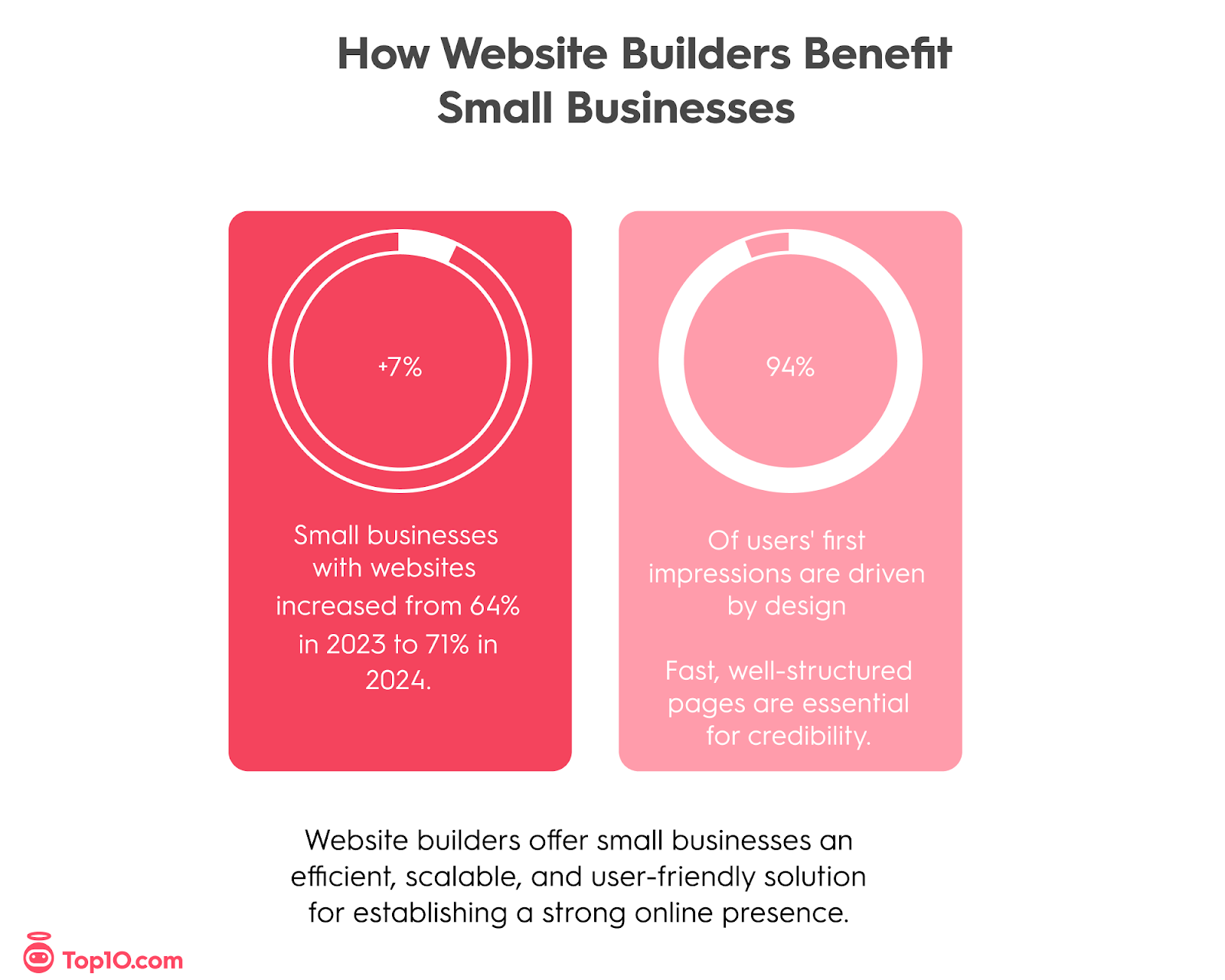
Hostinger’s web design statistics report notes that about 94% of users’ first impressions are driven by a site’s design and overall experience, making fast, well-structured pages essential for immediate credibility. And for most, a good website builder is key to achieving this.
Quick Answer: An online website builder is an all-in-one platform that lets anyone design, customize, and publish a website without coding. It provides templates, drag-and-drop editing, hosting, SEO, and ecommerce tools to make launching a professional site fast and affordable.
Key Insights
Website builders have transformed web design, offering professional results without technical skills or large budgets.
Drag-and-drop functionality and mobile-responsive templates make it possible for anyone to create a polished website in hours.
AI features now help users generate copy, choose designs, and optimize performance automatically.
Integrated hosting, SEO, and ecommerce tools simplify management, reducing the need for multiple subscriptions or plug-ins.
Scalability, data portability, and customer support remain key factors for long-term website success, especially when considering content migration between platforms.
How Do Website Builders Work?
Website builders combine design, hosting, and content management in one service. You select a template, customize text and visuals, and publish instantly. For most beginners, this streamlines the entire process of building a website, turning it into an intuitive, visual workflow rather than a technical one.
Drag-and-drop interfaces make the process intuitive, while integrated SEO, analytics, and ecommerce features keep management simple. Many users compare the experience to building with digital Lego blocks—visual, flexible, and easy to learn.
Website builders operate on their own content management systems, which ensures speed and security, though more advanced configuration options may not be accessible. For non-technical users, this is a strength: maintenance is automatic, and performance stays consistent rather than sporadic.
Compare With Top10.com, Choose the Best for You
At Top10.com, we recognize the importance of thorough and accurate product and service reviews in guiding your choices. Our team, comprising editors and industry experts, conducts extensive research to provide comprehensive insights. Our content is continually updated to reflect the latest market trends, offering current information.
We provide a range of services including comparison lists and in-depth reviews, all tailored to meet your specific needs. Our goal is to empower you to make confident and informed choices.

Advantages of Using a Website Builder
Website builders combine simplicity, speed, and affordability. You don't need to know how to build a website; you only need an idea and some content.
Platforms like Squarespace are often praised for being easy to set up, while Shopify offers integrated ecommerce tools that simplify selling online.
These services handle hosting, security, and performance optimization so you can focus on your business. You get easy drag-and-drop editing, professional templates, built-in SEO and marketing features, and flexible plans that grow with you. In short, these platforms help you build a website quickly, manage easily, and scale affordably.
Small businesses often overlook how efficient website builders actually are. While customization traditionally required coding, modern builders handle this automatically, though certain advanced features may still require custom development.
How to Choose the Best Website Builder
Start by identifying what you want to achieve online. Are you launching a blog, opening a store, or building a portfolio? Once you know your goal, look for the features that real users value most.
- Ease of use: Builders with true drag-and-drop functionality, such as Squarespace, stand out for beginners. Many describe them as simple, intuitive, and ready to launch within a day.
- Design flexibility: If you want deeper creative control, Webflow and WordPress are known for letting you design beyond templates.
- SEO and marketing tools: Shopify and Webflow earn consistent praise for their SEO structure, editable meta tags, and fast loading speeds.
- Pricing and value: Balance cost with features. Some builders seem inexpensive at first, but become costly as your site grows.
- Scalability and portability: Choose a platform that can handle future growth and allows you to migrate content easily.
- Customer support: Responsive help can make or break the experience. WordPress and IONOS users often point to strong community resources and reliable support.
By weighing these factors (ease, flexibility, performance, and cost), you can find the platform that fits both your current and future needs. When choosing the right website builder, also consider workflow efficiency: how quickly the platform allows updating, publishing, and site maintenance, and whether you’ll depend on multiple third-party add-ons that can slow performance and increase long-term costs.
Source:
Which Website Builder Is Right for You?
The best platform depends less on hype and more on your goals, design needs, and how much complexity you are willing to manage over time.
Squarespace: Best for creative professionals and brands that care most about design control, visual polish, and flexible layouts.
GoDaddy: Best for users who want speed and simplicity, with fewer advanced features but very quick setup for basic small-business sites.
IONOS: Best for value-focused businesses that want dependable performance, bundled hosting, and affordable scalability over time.
Shopify: Best for organizations that need robust ecommerce features and customization so they do not have to rebuild on a different platform later.
Real-world users often succeed by starting with something simple, then upgrading into more powerful tools as their needs grow. The biggest mistake is choosing a builder only for templates or AI features. Ease of use, scalability, and maintainability over the next few years matter far more than visual gimmicks.

GoDaddy
What Our Expert Says:
A great website builder isn't just about designing a site. It supports your entire digital presence. The platform to choose blends performance, flexibility, and SEO control with automation, making it accessible even to small businesses and
encouraging growth without needing a full development team.
Trista MoralesEducational UX & Content Consultant | Builder of Learning CulturesM.Ed.L, MS-ID
Our Recommendations for Website Builders
- Shopify: Best for full ecommerce stores of any size
- Squarespace: Best for portfolios, brands & visually polished sites
- IONOS: Best for simple small business and service websites
- Network Solutions: Best for simple beginner sites alongside domain/hosting
- Hostinger: Best for low-cost websites with built-in AI tools
Website Builder Comparison Table
Website Builder | Ease of Use | Design & Features | Design & Features | AI Functionality |
|---|---|---|---|---|
GoDaddy | Extremely easy guided setup for non-technical users | Streamlined templates with integrated marketing & social tools | Reliable for small business sites; 24/7 phone and chat support | AI Site Builder + Airo AI for marketing, content, headlines, and social |
IONOS | Straightforward AI-guided builder for fast launches | Business-focused templates, hosting bundle, SEO basics | Strong support with reliable performance | MyWebsite Now AI builder, AI-generated text/image tools, SEO helper |
Shopify | Simple guided store setup; easy product management | Advanced ecommerce features, robust app marketplace | Highly scalable for all business sizes; 24/7 support | Shopify Magic AI for product descriptions, image editing, setup assistance |
Squarespace | Intuitive all-in-one visual editor | Beautiful professional templates, built-in SEO & commerce | Stable performance; live chat and email support | AI-assisted site drafts, AI content tools, branding suggestions |
Hostinger | Very fast AI-guided setup with simple editing | Modern templates focused on speed; hosting included | High uptime and fast support; 24/7 chat | AI Site Builder, AI Writer, AI Image Generator, logo maker, SEO assistant |
Network Solutions | Beginner-friendly, basic interface | Simple templates with integrated hosting/domain services | Suitable for small business & personal sites; phone/ticket support | Limited AI; basic automated layout and content suggestions |
SITE123 | Extremely easy step-by-step setup | Pre-built blocks; limited customization but very fast | Great for simple sites; 24/7 live chat | AI text generator, AI logo maker, automated layout suggestions |
Jimdo | Minimalistic and simple; great for non-technical users | Clean templates; strong legal compliance features (EU-friendly) | Best for freelancers/small businesses; email support | “Dolphin” AI builder creates sites from Q&A; AI text tools |
HubSpot CMS | More advanced; tailored for marketers and teams | Dynamic content, CRM integration, enterprise CMS capabilities | Highly scalable with dedicated support | AI content assistant (text/images), CRM-driven personalization & recommendations |
Square Online | Extremely easy, especially for Square POS users | Retail-ready templates with seamless POS integration | Excellent for small retail/food businesses; 24/7 support | AI product descriptions, AI image editing, automated product/category creation |
Website Builder Comparisons
GoDaddy vs IONOS
GoDaddy is known for fast setup. Its guided builder gets your site live quickly and includes built-in tools for bookings, contact forms, and marketing.
IONOS focuses on performance and business growth. It combines hosting, domains, and security within one plan and is often praised for reliable uptime and professional customer service.
Conclusion: GoDaddy is perfect for quick launches and simple sites, while IONOS offers better long-term value and performance for growing businesses.
Which Website Builders Have AI Tools?
AI is now a core feature in modern builders, moving beyond simple copy generation into end‑to‑end site creation, optimization, and marketing assistance.
Hostinger: Stands out for speed and budget, offering an AI website generator, AI writer, AI logo maker, and AI attention heatmap, plus an assistant and AI SEO tools to optimize structure and performance.
Shopify: Aims its Shopify Magic tools directly at commerce, generating product descriptions, marketing emails, ad and social content, and supporting store management via AI assistance.
Squarespace: Uses Blueprint AI to ask guided questions, then produces on‑brand design drafts and content, while Brand Identity and related tools keep copy, layouts, and visuals consistent with your chosen voice.
GoDaddy: Leverages its Airo AI experience to generate social posts, email campaigns, and a marketing calendar, with new Airo.ai agents helping automate broader marketing and site management workflows.
Industry analysis of AI in content workflows shows that, as a rule of thumb, AI tools can reduce content creation time by around 50%, meaning tasks that once took an hour can often be completed in about thirty minutes. This aligns with how AI is used inside website builders: it accelerates drafting, layout, and basic SEO setup, while human review remains essential for accuracy, brand alignment, and strategic decisions.
What Our Expert Says
AI tools are changing how websites are designed and constructed, but they're most powerful when combined with human strategy and innovation. AI excels at efficiency, but authentic branding comes from unique content planning and user experience design.
Trista MoralesEducational UX & Content Consultant | Builder of Learning CulturesM.Ed.L, MS-ID
How Much Does a Website Builder Cost?
Free plans: Best for testing and learning. Useful to try features and layouts, but limited for serious business use
Personal sites: Entry-level paid tiers for simple or personal sites usually sit around $5–$15 per month.
Business and ecommerce: Typical small-business and ecommerce plans fall in the $20–$50 per month range, with premium tiers above that for advanced tools and higher limits.
Hidden and variable costs: Some services charge extra for apps, additional storage, higher traffic allowances, or premium templates, so transparency matters more than the initial sticker price.
Total cost of ownership: Always factor in domains, renewals, transaction fees, and add-ons. A plan that looks cheap upfront can become more expensive once you add the features, bandwidth, and integrations your site actually needs.

IONOS
What Are the Best Free Website Builders?
Free plans are useful for testing layouts and learning how builders work, especially on platforms like GoDaddy, where setup is quick, and interfaces are beginner‑friendly.
Free plan limitations: Most free website builder plans show platform ads and lock you into a subdomain instead of a custom domain.
Upgrade trend: My Codeless Website’s 2025 website builder statistics highlight that businesses increasingly treat their sites as a core digital asset, reinforcing that serious projects tend to move from free to paid plans for better performance, SEO, and branding.
Professional features: Paid plans typically unlock SEO controls, analytics, higher storage and bandwidth, and e‑commerce or integration features that free tiers restrict.
Best use of free plans: Free plans are excellent for experimenting with layouts and practicing design skills, but they are not a sustainable long‑term solution for most business websites.
Some users choose the Google website builder (Google Sites) for quick, minimal sites, but it doesn’t offer the design flexibility or features of full website builders.
How We Test Website Builders
Our team combines in-depth hands-on testing with real-world community insights to give you the most complete picture possible.
We build sample sites on every major platform and evaluate ease of use, design flexibility, SEO performance, scalability, and support. We also consider user feedback from online communities such as Reddit, where builders like Shopify and Squarespace are frequently mentioned for their drag-and-drop simplicity, design quality, and reliability.
Each review is updated regularly to reflect new features, pricing, and performance changes so our recommendations stay accurate and relevant.
A truly valuable website builder must be evaluated beyond surface-level features. Effective examination looks at how the platform performs under real conditions: performance with media-heavy content, mobile consistency across multiple devices, and whether the workflow helps users create a unique feel for their website. Support availability and real user feedback (such as day-to-day usability) are also critical considerations.

Key Expert Insights by Trista Morales
- Website builders are evolving from simple design tools to complete digital ecosystems. The strongest platforms now combine AI, user analytics, and unique branding tools, making ecommerce accessible while supporting long-term growth.
- Many users select website builders based on templates, but more important factors include SEO controls, integration options, and content portability. These elements determine whether you can scale effectively or migrate to another platform later.
- AI speeds up content design, but SEO success depends on human strategy, like keyword placement, site structure, and understanding your audience. Platforms that give you more control over SEO deliver the best results.
- Consider your 12-24 month goals: API integrations, smooth ecommerce scalability, and avoiding the need to rebuild from scratch. Choose a platform that supports where you're headed, not just where you are.
- The most valuable platforms balance ease of use with advanced capabilities. Lower-cost plans work for starting, but examine upgrade costs carefully to ensure efficient growth without unexpected expenses.
Our Methodology: How We Reviewed the Best Website Builders
We combined hands-on testing, industry analysis, and real user feedback to evaluate the best website builders for 2025. Our goal was to assess which platforms deliver the best mix of ease of use, performance, and long-term value.
Our Evaluation Criteria:
Ease of Use and Accessibility: Tested setup time, learning curve, and quality of tutorials.
Design Flexibility: Compared customization options, template variety, and mobile responsiveness.
SEO and Performance: Measured page speed, on-page SEO tools, and analytics features.
AI and Automation: Reviewed AI-assisted design, content generation, and workflow automation.
Ecommerce and Scalability: Tested product setup, payment options, and growth tools.
Support and Resources: Evaluated response times, knowledge base quality, and support channels.
Pricing and Value: Compared cost vs. functionality, transparency, and available free trials.
We also considered community feedback from platforms like Reddit, PCMag, and TechRadar to ensure our findings reflect real-world user experiences. Each website builder was tested for ease of use, scalability, and overall performance.
Our Top 3 Picks
- 1Very good8.8Create a sophisticated website in just hoursCreate a sophisticated website in just hoursRead Squarespace Review
Squarespace has built its reputation on clean, aesthetically precise design. Its native styling system consistently outperforms competitors in visual presentation, making it the go-to choice for creative professionals focused on strong branding.
Blueprint AI, introduced in recent updates, is a standout feature for maintaining branding consistency. It asks guided questions to generate elegant design drafts while helping you establish and maintain a cohesive brand identity across your entire site. The platform's templates are mobile-optimized and maintain design integrity across all devices.
Best for: Designers, photographers, artists, and creative businesses that prioritize visual branding and aesthetic consistency over extensive third-party integrations.
Squarespace Pros & Cons
PROS
Top-notch website themesResponsive designsStrong ecommerce featuresCONS
No phone supportLimited number of templates - 2Very good8.6Marketing & ecommerce tools for small businessesMarketing & ecommerce tools for small businessesRead IONOS Review
IONOS is a reliable e-commerce website builder geared toward small business owners. With IONOS, creating a website is hassle-free—even if you've never done it before. You can easily cross-sell and upsell products on individual product pages to boost your profits, and you get a comprehensive abandoned cart recovery feature (which not all website builders offer).
It's easy to scale your business with IONOS, and even sell across the most popular social networks and marketplaces, such as Facebook, Instagram, Google Shopping, and Amazon. It has a limited number of templates (we counted 19), but they're all well-designed and built for mobile responsiveness.
Why we chose IONOS: IONOS is a top choice if you want to build an e-commerce store fast. Its subscription fees (even for the premium plans) are quite affordable, especially in the first 6-12 months. After this period, subscription fees increase but IONOS is transparent with its pricing—no nasty surprises.
Our experience: We found IONOS' dashboard, known as the Presence Suite, to be an intuitive system for managing your website and online presence. Plus, the website builder is specifically designed for beginners, so it's pretty easy to figure out.IONOS Pros & Cons
PROS
Powerful e-commerce features at a reasonable priceMobile-responsive templatesTrack your competitors' activity on Google and social mediaCONS
Limited number of templatesOnly 10 pages with the first-tier plan - 3Good8.2Drag-and-drop website builder for basic sitesDrag-and-drop website builder for basic sitesRead Network Solutions Review
The Network Solutions website builder is a basic drag-and-drop site builder that lets you get online in minutes. It comes with 150+ professionally designed templates, a free domain, and cheap introductory pricing. Pre-designed content blocks let you put together a custom site in minutes, and every site is mobile-responsive.
Network Solutions Pros & Cons
PROS
More than 150 well-designed templatesVery easy-to-use drag-and-drop editorMarketing tools availableCONS
Very expensive after introductory pricingLimited design flexibility




53,750 people
chose a website builder this month
Editorial Reviews
The Best Web Design Software Companies for 2026
Aug 21, 2026
How Much Does It Cost to Build a Website in 2026?
Aug 21, 2026
10 First Post Ideas to Introduce Your New Business on Social Media
Aug 21, 2026